AI Gives You Answers.
The Stack Lets It Ship.
A chat can't publish a page, remember a customer or send an email. Connect Claude to GitHub, Vercel and Supabase and it can. One prompt sets it up on your machine, and you finish with a live website writing to your own database.
Free tiers for every tool. The only paid piece is your Claude plan.
Your own address on the internet, deployed again every time you change it.
Customers and leads saved in Supabase, not lost in a chat window.
Claude Code and your agent team, set up and ready for the next project.
Start with the overview
Why a stack, what gets installed, and what you have at the end. Then pick your machine below.
Before you start
Claude Max for the first month. The free and Pro plans run out of room partway through the build.
Installed and signed in on your paid plan. Everything happens in its Code tab.
Work laptops locked down by IT are the number one reason an install stalls. Use a personal machine if that is you.
Vercel gives you a live web address and Resend sends test emails to your own inbox. Your real domain can come later.
1. Watch the install on a Mac
2. Paste the prompt
Open the Claude desktop app, click the Code tab, pick a model, and paste this into the box at the bottom. Fill in the three lines under step 3 first, or delete the last one and answer Claude's questions instead.
I'm not a developer. Please set up Infinite Leverage for me, and do as much
of it yourself as you can.

HOW TO WORK WITH ME
- I am on a Mac. Everything runs in the Terminal. There is no WSL or Ubuntu
  step for me.
- Plain English only. No jargon. Never paste a raw error at me: tell me
  what it means and what you need from me.
- Don't show me long command output. Just tell me what happened.
- One question at a time, then wait for my answer.
- Never ask me to edit a file. Tell me what to paste, and you make the change.
- If you need my permission to run something, say in one sentence what it
  does, then go ahead.
- Every time we finish one of the steps below, tell me "You are now at
  step N: <name>" and remind me to click that step under "Where are you at?"
  on The Stack page, so my progress stays up to date.
- If I say I'm lost, tell me which step I'm at, what the screen in front of
  me should look like, and point me to the setup map on The Stack page.
- If I paste this prompt into a new chat, check what is already done and
  carry on from the first step that isn't.

THE 11 STEPS
1. Mac ready, the Claude desktop app installed and signed in on a paid plan.
2. Terminal open, it ends in % or $, and git --version answers. If it offers to install the Command Line Tools, accept.
3. Code tab open, a model picked, and the folder inside code-projects.
4. Infinite Leverage installed: typing /il in the Code tab box shows il-doctor in the list.
5. GitHub, Vercel and Supabase accounts created, all with one GitHub login, and Vercel on the free Hobby plan.
6. Authorize clicked for all three CLIs: gh, vercel and supabase.
7. The project files are visible on github.com.
8. The .vercel.app address loads in the browser.
9. .env.local has the Supabase keys.
10. The contacts table exists in Supabase.
11. The contact form on the .vercel.app address writes a row to that table.

THINGS ONLY I CAN DO
You're not allowed to do these for me. When you reach one, stop, give me
click-by-click instructions, and wait for me:
- Signing in to GitHub (gh auth login)
- Creating accounts: GitHub, Supabase, Vercel, and Stripe if I need payments
- Copying keys out of those dashboards

Everything else is yours.

START HERE: THE PLUGIN (step 4)
1. Check the claude command works in the terminal (claude --version). If it
   says command not found, install Claude Code's command line with
     curl -fsSL https://claude.ai/install.sh | bash
   then check again.
2. Install the plugin:
     claude plugin marketplace add edge8-ai/infinite-leverage
     claude plugin install infiniteleverage@infiniteleverage
   If an "infiniteleverage" marketplace is already there from an older
   install, remove it first (claude plugin marketplace remove
   infiniteleverage), then add it again.
3. Run claude plugin list and confirm infiniteleverage is installed and
   enabled.
4. Skills only load when a chat starts, so this chat may not see them yet.
   Tell me to start a new chat in the Code tab, in the same folder, and paste
   this same prompt again. In the new chat, check /il-doctor (or its full
   name, /infiniteleverage:il-doctor) is found before going any further.
   Do not improvise and do not build without the skills.

THEN
1. Tell me which accounts I'll need and let me go create them. On Vercel I
   pick the free Hobby plan; I upgrade to Pro only once the site moves to
   production. Don't carry on until I say I'm ready.
2. Run /il-doctor. Fix whatever you can fix yourself. For anything you can't,
   walk me through it, then run it again until every line passes.
3. Run /il-project to build my project:
   - Call it: <PROJECT NAME>
   - Folder name: <project-name-with-dashes>
   <Describe your business in a few sentences: what it does, who it's for,
   what you want built first. Mention a website you like the look of if you
   have one. Delete this line to answer questions later instead.>
4. Set up my keys. Tell me exactly where to click to find each one, I'll
   paste the values to you, and you put them in the right file. Confirm
   afterwards that the file with my keys in it won't end up on GitHub.
5. Check that the project builds.
6. Do not put anything on GitHub until you've asked me first.

WHEN YOU'RE DONE
Tell me, in plain English: what you built, where it is on my computer, and
the three things I should try first. Keep it short.

IF YOU GET STUCK
Stop and tell me. Don't guess, don't invent a workaround, and don't tell me
something worked when it didn't.
3. Where are you at?
When the sentence on the button is true for you, click it and you move one step forward. Click any number to go back to that step. Only you see your own progress.
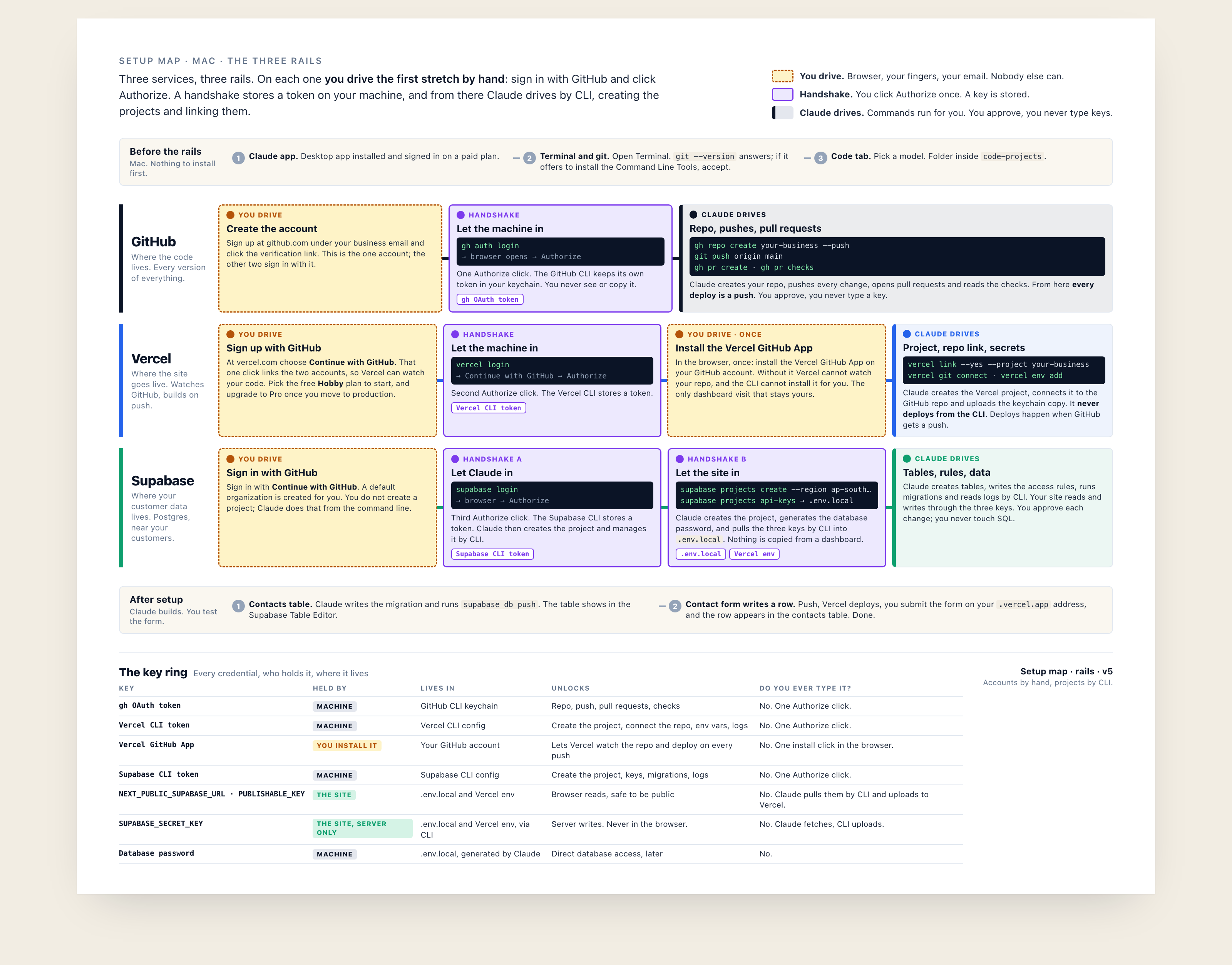
4. The setup map
Pro Tip: If you feel lost, copy this image into Claude and ask: Where are we on the map?
The four tools, in plain English
Claude and your agents run all of these for you. This is so the names feel familiar when you see them.
One safe home for every file in your project, with a complete history of every change. If it is not in GitHub, it does not count.
Puts your website on the internet, automatically. Every change gets a private preview link first, then becomes the live site once approved. Start on the free Hobby plan and upgrade to Pro once you move to production.
Where your site keeps what it needs to remember: your people, leads, orders, and the sign-ins for your admin.
Sends email from your system: the confirmation when a lead comes in, the notification to you.
Want your team on the stack?
We run this install with leadership teams, then build their first AI program on top of it.
Book a ConversationGet the 8 Edges Operating System, free.
Your stack is ready for more than a contact form. Put a whole company OS on it: CRM, hiring, coaching and operations, with the agents that run them. Fork it free. No trial, no crippled tier.
Get 8 Edges Free